Wednesday, 26 August 2015

Web Services in java

Topics

1.Define  Web Services in java
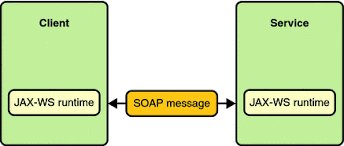
Web Services tutorial is designed for beginners and professionals providing basic and advanced concepts of web services such as protocols, SOAP, RESTful, java web service implementation, JAX-WS and JAX-RS tutorials and examples.
Web service is a technology to communicate one programming language with another. For example, java programming language can interact with PHP and .Net by using web services. In other words, web service provides a way to achieve interope

Web Services Examples

In this tutorial, we will see a lot of web services examples like JAX-WS example by RPC style, JAX-WS example by document style, JAX-RS example by Jersey and JAX-RS example by RESTeasy implementation.


Image result for Web Services in java

Monday, 24 August 2015

Inter-Servlet Communication

Servlet Communication


Communication between Java servlets is called as Servlet communication. It is nothing but, sending users request and the response object passed to a servlet to another servlet. You may ask, what is the use of passing these objects. Well, i have an answer. As seen in the servlet examples written till date, one common method we are using, getParameter(), used to get the user input value in a specified field. So, when a request object is passed from one servlet to another servlet, then you can use this method to get the input that the user has given in a HTML/JSP form. Following example, gives better understand of what is said now.

Servlet Communication - Folder Structure


webapps
      |_ servletcom
                  |_ index.html
                  |_ WEB-INF
                               |_ web.xml
                               |_ classes
                                        |_ FirstServlet.java
                                        |_ FirstServlet.class
                                        |_ FinalServlet.java
                                        |_ FinalServlet.class


Servlet Communication - index.html


<html>
<head>
<title>Servlet-Servlet Communication</title>
</head>
<body>

<form action="/servletcom/pass" method="post">

Name: <input type="text" name="uname" width="20" />
Password: <input type="password" name="pass" width="20" />
<input type="submit" name="submit" value="Login" />

</form>

</body>
</html>


form: User input is taken in a form containing input fields.

action="/servletcom/pass"/pass is the url pattern in web.xml and the servletcom is the name of the project (folder name). The project folder name must be specified here for sure, else the statement means to search in the webapps directory but not within the project.

method="post": Invisible submission, at the background.

name="uname": Used to get the value in this field in Servlet class.

name="pass": Used to get the value in this field in Servlet class.


Servlet Communication - web.xml


<web-app>

<servlet>
<servlet-name>comservlet</servlet-name>
<servlet-class>FirstServlet</servlet-class>
</servlet>

<servlet-mapping>
<servlet-name>comservlet</servlet-name>
<url-pattern>/pass</url-pattern>
</servlet-mapping>


<servlet>
<servlet-name>lservlet</servlet-name>
<servlet-class>FinalServlet</servlet-class>
</servlet>

<servlet-mapping>
<servlet-name>lservlet</servlet-name>
<url-pattern>/we</url-pattern>
</servlet-mapping>

</web-app>

Here i wrote 2 classes, for servlet communication, as /pass is the url pattern pointing that the corresponding action controlling class is FirstServlet, and also, the user's data sent to this url pattern, FirstServlet will be called first by the servlet container. Next one, /we, when servlet container gets request to the url-pattern /we, the FinalServlet class will be invoked.

For better understand, See Understanding web.xml in Java Servlets


Servlet Communication - FirstServlet.java


import javax.servlet.http.*;
import javax.servlet.*;
import java.io.*;
public class FirstServlet extends HttpServlet
{
public void doPost(HttpServletRequest req,HttpServletResponse res) throws ServletException,IOException
{

String uname=req.getParameter("uname");
String pass=req.getParameter("pass");

getServletContext().getRequestDispatcher("/we").forward(req,res);

}
}

getServletContext():  Gets the ServletContext object. ServletContext is an interface, and may be an implementation class of ServletContext is written and it's object is sent. ServletContext is created by the Servlet Container (Tomcat here) and by using this method we will call it. This object contains common data for the entire web application, so reusable and also helps in communicating with the servlet container because it was generated by the Servlet Container (could also be one of the reason).

getRequestDispatcher(): This is a method of the ServletContextinterface.This returns RequestDispatcher object which is again an interface and may be some implementation class is written and its object is sent (to us). The purpose of this method is to pass the request to another servlet. It takes String as parameter, which is the url-pattern pointing the servlet that we are going to send the request to (here FinalServlet).

forward(req,res): This is a method in RequestDispatcher interface, that helps us to forward user's request to another servlet (the servlet that theRequestDispatcher object points out to) (FinalServlet here).

Friday, 21 August 2015

Request and Response Interface

Details about the Request interface and the Response interface.

  • HttpServlet gets request from a client (browser) on the HttpServletRequest interface and can return response to the client through the HttpServletResponse interface in all the doXXXX methods.
  • Here is some of most used HttpServletRequest Methods:

    MethodDescription
    public Enumeration getParameterNames()Names of the parameters contained in this request.
    public String[] getParameterValues(String name)Used when the named parameter may have multiple values.
    public Map getParameterMap()Returns all the parameters stored in a Map object.
    public BufferedReader getReader()This will retrieve the body of a request as characters into a BufferedReader.
    public ServletInputStream getInputStream()This will retrieve the body of a request as binary data into a ServletInputStream.
    public Enumeration getHeaderNames()Returns an enumeration of all the header names this request contains.
    public String getQueryString()This will return the query string that is contained in the request URL after the path.
    public RequestDispatcher getRequestDispatcher(String path)A RequestDispatcher object can be used to forward a request to the resource or to include the resource in a response.
  • You have to use either the getReader() method or the getInputStream(). You cannot combine to use these for the same request.
  • Here is some of most used HttpServletResponse Methods:

    MethodDescription
    public PrintWriter getWriter()This will return a PrintWriter object that can send character text to the client.
    public ServletOutputStream getOutputStream()This will return a ServletOutputStream suitable for writing binary data in the response.
    public addHeader(String name, String value)This will add a property, which is a String name with a String value to the response header.
    public addDateHeader(String name, long date)This will add a property, which is a String name with a long date value to the response header.
    public void sendRedirect(String location)This will send a temporary redirect response to the client using the specified redirect location URL.
    public Enumeration getHeaderNames()Returns an enumeration of all the header names this request contains.
  • You have to use either the getWriter() method or the getOutputStream(). You cannot combine to use these for the same response

Thursday, 20 August 2015

Servlet Config and Context in java.

Topics

1. Introduction to Servlet Config and Context in java.


ServletContext Interface

the web container at time of deploying the project. This object can be used to get configuration information from web.xml file. There is only one ServletContext object per web application.
If any information is shared to many servlet, it is better to provide it from the web.xml file using the <context-param> element.

Advantage of ServletContext

Easy to maintain if any information is shared to all the servlet, it is better to make it available for all the servlet. We provide this information from the web.xml file, so if the information is changed, we don't need to modify the servlet. Thus it removes maintenance problem.


2.ServletConfig Interface

An object of ServletConfig is created by the web container for each servlet. This object can be used to get configuration information from web.xml file.
If the configuration information is modified from the web.xml file, we don't need to change the servlet. So it is easier to manage the web application if any specific content is modified from time to time.

Advantage of ServletConfig

The core advantage of ServletConfig is that you don't need to edit the servlet file if information is modified from the web.xml file.

Wednesday, 19 August 2015

Servlet Architecture

Servlet Architecture: Basics of Servlets

A Servlet is a class, which implements the javax.servlet.Servletinterface. However instead of directly implementing thejavax.servlet.Servlet interface we extend a class that has implemented the interface like javax.servlet.GenericServlet orjavax.servlet.http.HttpServlet.
servlet-architecture

Servlet Exceution

This is how a servlet execution takes place when client (browser) makes a request to the webserver.
servlet architecture diagram2

Servlet architecture includes:

a) Servlet Interface
To write a servlet we need to implement Servlet interface. Servlet interface can be implemented directly or indirectly by extending GenericServlet orHttpServlet class.
b) Request handling methods
There are 3 methods defined in Servlet interface: init(), service() and destroy().
The first time a servlet is invoked, the init method is called. It is called only once during the lifetime of a servlet. So, we can put all your initialization code here.
The Service method is used for handling the client request. As the client request reaches to the container it creates a thread of the servlet object, and request and response object are also created. These request and response object are then passed as parameter to the service method, which then process the client request. The service method in turn calls the doGet or doPost methods (if the user has extended the class from HttpServlet ).
c) Number of instances

Basic Structure of a Servlet

public class firstServlet extends HttpServlet {
   public void init() {
      /* Put your initialization code in this method, 
       * as this method is called only once */
   }
   public void service() {
      // Service request for Servlet
   }
   public void destroy() {
      // For taking the servlet out of service, this method is called only once
   }
}

Tuesday, 18 August 2015

Servlet in java

Topics


1. Introduction to Servlet

The web container maintains the life cycle of a servlet instance. Let's see the life cycle of the servlet:
  1. Servlet class is loaded.
  2. Servlet instance is created.
  3. init method is invoked.
  4. service method is invoked.
  5. destroy method is invoked.
Life cycle of a servletAs displayed in the above diagram, there are three states of a servlet: new, ready and end. The servlet is in new state if servlet instance is created. After invoking the init() method, Servlet comes in the ready state. In the ready state, servlet performs all the tasks. When the web container invokes the destroy() method,.


2.    Life Cyclen of Servlet.


A servlet life cycle can be defined as the entire process from its creation till the destruction. The following are the paths followed by a servlet
  • The servlet is initialized by calling the init () method.
  • The servlet calls service() method to process a client's request.
  • The servlet is terminated by calling the destroy() method.
  • Finally, servlet is garbage collected by the garbage collector of the JVM.

Image result for servlet life cycle in java

Monday, 17 August 2015

JDBC Connectvity

About JDBC Code


The basic process for a single data retrieval operation using JDBC would be as follows.
  • a JDBC driver would be loaded;
  • a database Connection object would be created from using the DriverManager (using the database driver loaded in the first step);
  • Statement object would be created using the Connection object;
  • a SQL Select statement would be executed using the Statement object, and a ResultSetwould be returned;
  • the ResultSet would be used to step through (or iterate through) the rows returned and examine the data.
The following JDBC code sample demonstrates this sequence of calls.
JDBCSample.java
import java.sql.*;
 
public class JDBCSample {
 
public static void main( String args[]) {
 
String connectionURL = "jdbc:postgresql://localhost:5432/movies;user=java;password=samples";
// Change the connection string according to your db, ip, username and password
 
try {
 
    // Load the Driver class. 
    Class.forName("org.postgresql.Driver");
    // If you are using any other database then load the right driver here.
 
    //Create the connection using the static getConnection method
    Connection con = DriverManager.getConnection (connectionURL);
 
    //Create a Statement class to execute the SQL statement
    Statement stmt = con.createStatement();
 
    //Execute the SQL statement and get the results in a Resultset
    ResultSet rs = stmt.executeQuery("select moviename, releasedate from movies");
 
    // Iterate through the ResultSet, displaying two values
    // for each row using the getString method
 
    while (rs.next())
        System.out.println("Name= " + rs.getString("moviename") + " Date= " + rs.getString("releasedate"));
}
catch (SQLException e) {
    e.printStackTrace();
}
catch (Exception e) {
    e.printStackTrace();
}
finally {
    // Close the connection
    con.close();
}
}
}

Thursday, 13 August 2015

JDBC (Java Database Connectivity)

Java JDBC

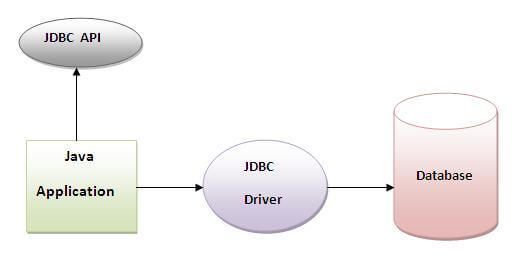
Java JDBC is a java API to connect and execute query with the database. JDBC API uses jdbc drivers to connect with the database.
JDBC (Java Database Connectivity)

Why use JDBC

Before JDBC, ODBC API was the database API to connect and execute query with the database. But, ODBC API uses ODBC driver which is written in C language (i.e. platform dependent and unsecured). That is why Java has defined its own API (JDBC API) that uses JDBC drivers (written in Java language).
Do You Know
  • How to connect Java application with Oracle and Mysql database using JDBC?
  • What is the difference between Statement and PreparedStatement interface?
  • How to print total numbers of tables and views of a database using JDBC ?
  • How to store and retrieve images from Oracle database using JDBC?
  • How to store and retrieve files from Oracle database using JDBC?

What is API

API (Application programming interface) is a document that contains description of all the features of a product or software. It represents classes and interfaces that software programs can follow to communicate with each other. An API can be created for applications, libraries, operating systems, etc


JDBC Driver

JDBC Driver is a software component that enables java application to interact with the database.There are 4 types of JDBC drivers:
  1. JDBC-ODBC bridge driver
  2. Native-API driver (partially java driver)
  3. Network Protocol driver (fully java driver)
  4. Thin driver (fully java driver)

1) JDBC-ODBC bridge driver

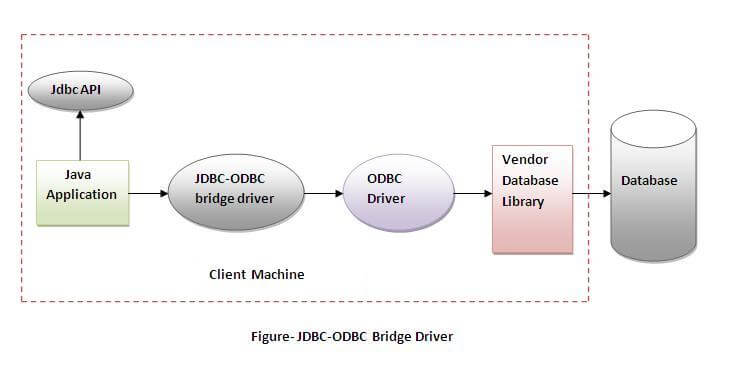
The JDBC-ODBC bridge driver uses ODBC driver to connect to the database. The JDBC-ODBC bridge driver converts JDBC method calls into the ODBC function calls. This is now discouraged because of thin driver.
bridge driver

Advantages:

  • easy to use.
  • can be easily connected to any database.

Disadvantages:

  • Performance degraded because JDBC method call is converted into the ODBC function calls.
  • The ODBC driver needs to be installed on the client machine.

2) Native-API driver

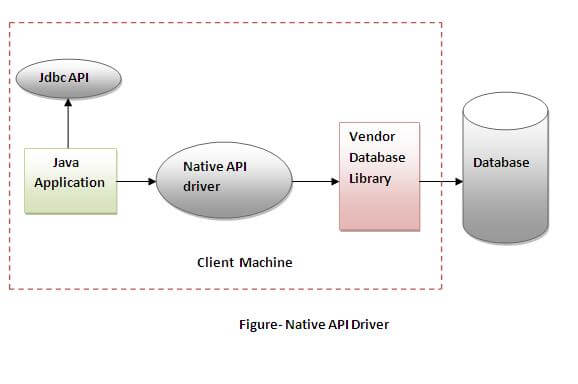
The Native API driver uses the client-side libraries of the database. The driver converts JDBC method calls into native calls of the database API. It is not written entirely in java.
Native-API driver

Advantage:

  • performance upgraded than JDBC-ODBC bridge driver.

Disadvantage:

  • The Native driver needs to be installed on the each client machine.
  • The Vendor client library needs to be installed on client machine.

3) Network Protocol driver

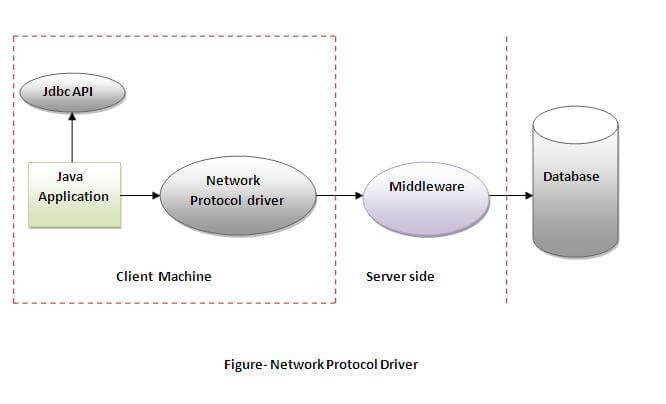
The Network Protocol driver uses middleware (application server) that converts JDBC calls directly or indirectly into the vendor-specific database protocol. It is fully written in java.
Network Protocol driver

Advantage:

  • No client side library is required because of application server that can perform many tasks like auditing, load balancing, logging etc.

Disadvantages:

  • Network support is required on client machine.
  • Requires database-specific coding to be done in the middle tier.
  • Maintenance of Network Protocol driver becomes costly because it requires database-specific coding to be done in the middle tier.

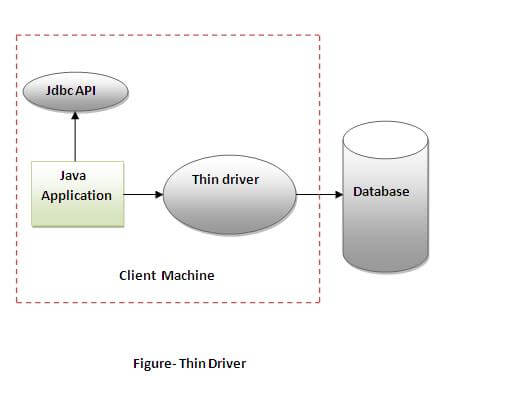
4) Thin driver

The thin driver converts JDBC calls directly into the vendor-specific database protocol. That is why it is known as thin driver. It is fully written in Java language.
Thin driver

Advantage:

  • Better performance than all other drivers.
  • No software is required at client side or server side.

Disadvantage:

  • Drivers depends on the Database.

Wednesday, 12 August 2015

Input and Output Stream in java

Topics

1.Introduction to Input and Output Stream in java.

In Java, FileInputStream and FileOutputStream classes are used to read and write data in file. In another words, they are used for file handling in java.

2.Output Stream

Java FileOutputStream is an output stream for writing data to a file.
If you have to write primitive values then use FileOutputStream.Instead, for character-oriented data, prefer FileWriter.But you can write byte-oriented as well as character-oriented data.


File Handling and Input/Output

java.io package
Classes related to input and output are present in the JavaTM language package java.io . Java technology uses "streams" as a general mechanism of handling data. Input streams act as a source of data. Output streams act as a destination of data.

File class
The file class is used to store the path and name of a directory or file. The file object can be used to create, rename, or delete the file or directory it represents. The File class has the


IO Stream

Java performs I/O through Streams. A Stream is linked to a physical layer by java I/O system to make input and output operation in java. In general, a stream means continuous flow of data. Streams are clean way to deal with input/output without having every part of your code understand the physical.
Java encapsulates Stream under java.io package. Java defines two types of streams. They are,

  1. Byte Stream : It provides a convenient means for handling input and output of byte.
  2. Character Stream : It provides a convenient means for handling input and output of characters. Character stream uses Unicode and therefore can be internationalized.

Tuesday, 11 August 2015

Life Cycle Of Thread

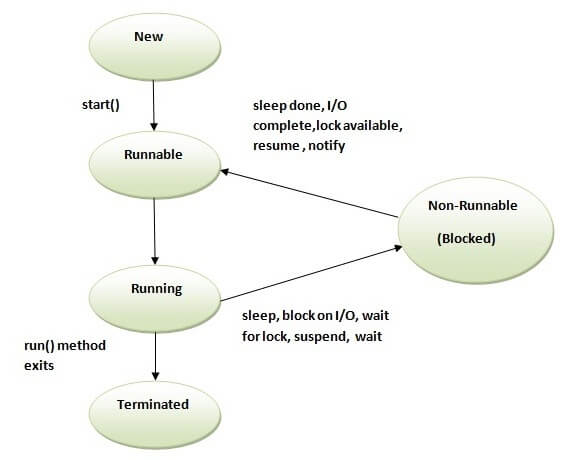
Life cycle of a Thread (Thread States)

A thread can be in one of the five states. According to sun, there is only 4 states in thread life cycle in java new, runnable, non-runnable and terminated. There is no running state.
But for better understanding the threads, we are explaining it in the 5 states.
The life cycle of the thread in java is controlled by JVM. The java thread states are as follows:
  1. New
  2. Runnable
  3. Running
  4. Non-Runnable (Blocked)
  5. Terminated
thread life cycle in java

1) New

The thread is in new state if you create an instance of Thread class but before the invocation of start() method.

2) Runnable

The thread is in runnable state after invocation of start() method, but the thread scheduler has not selected it to be the running thread.

3) Running

The thread is in running state if the thread scheduler has selected it.

4) Non-Runnable (Blocked)

This is the state when the thread is still alive, but is currently not eligible to run.

5) Terminated


A thread is in terminated or dead state when its run() method exits.