Friday, 30 October 2015

Struts2 Architecture

Struts2 Architecture


Struts2 is based upon MVC2 Architecture.
MVC stands for Model View Control. Model will work with business logic of an application and it's nothing but bean and pojo as a model (It is nothing but a database related programming).

View works as a presentation logic in an application. We use jsp/html for presentation logic. 

Control works as a business logic in an application which is used to handle request and response and execute a particular logic. We use servlet as a controller.

Execution flow of Struts2


When a client puts request to the application, the request will be received by the container.

The container loads the web.xml file and verify the URL. After verification, the request is transferred to Filter Dispatcher by the container.

Filter Disptcher takes the help of ActionProxy and ConfigurationManager to read the struts.xml file. (Configuration class loads the struts.xml) 

FilterDispatcher, ActionProxy, ConfigurationManager, Struts2 work as front Controller. After getting information from struts.xml and ConfigurationManager, ActionProxy invokes the ActionInvocation which executes the interceptors

ActionInvocation receives the result generated by the action class.
Then ActionProxy transfers the result back to the FilterDispatcher and FilterDispatcher finds the view and sends the result.

Thursday, 29 October 2015

Struts2 Features

Struts2 Features


• Easy Integration

It can easily intergrate with any other frameworks. Every framework must provide the abstraction layer for integrating with other frameworks. Spring is the leading framework which supports the maximum possible integrations. Struts 2 provides the more number of integration.

• Improved Tags and Customization

Struts 2 has modified the existing form tags that helped in the reduction in the amount of code written by the developers. It is very easy to extend the tags and write our own functionality. Tag markups in Struts2 can be changed using Freemarker templates which does not require any advanced knowledge like JSP or java.

• POJO Based forms and actions

Struts framework uses actions and action forms for receiving the inputs. These classes extend the Struts API and not the plain POJOs. So to remove this problem, Struts 2 now uses the plain POJOs to receive inputs from the form fields.

• Minimal Conigurations

Most of the settings in Struts2 take the default values unless if there is any deviation from the default settings and so a minimal configuration is required for the \struts2 application.

• Integrate View Technolfogies

It supports various view technologies like XSLT, JSP, Freemarker, velocity, etc.

• AJAX Functionality

With the introduction of Web 2.0 technologies, AJAX is the integral part of any web frameworks and so it becomes necessary to support AJAX within the Struts 2 framework.

• Theme and Templates

Struts 2 provides 3 types of themes: xhtml, simple and css_xhtml. The xhtml is default theme of struts 2. Themes and templates can be used to change the over all look of a website by changing the theme files.

Other features include Struts2 supports extensive validation. It also has in-built support for I18n.

Wednesday, 28 October 2015

CSS Margin

CSS Margins

The CSS margin properties set the size of the white space OUTSIDE the border.

With CSS, you have full control over the margins. There are CSS properties for setting the margin for each side of an element (top, right, bottom, and left).

Margin - Individual Sides

CSS has properties for specifying the margin for each side of an element:
  • margin-top
  • margin-right
  • margin-bottom
  • margin-left
All the margin properties can have the following values:
  • auto - the browser calculates the margin
  • length - specifies a margin in px, pt, cm, etc.
  • % - specifies a margin in % of the width of the containing element
  • inherit - specifies that the margin should be inherited from the parent elemenT.
EXAMPLE:
{
    margin-top: 100px;
    margin-bottom: 100px;
    margin-right: 150px;
    margin-left: 80px;
}

Tuesday, 27 October 2015

CSS

CSS

CSS Syntax


CSS is a style-sheet language that describes the presentation of an HTML (or XML) document.
CSS describes how elements must be rendered on screen, on paper, or in other media.
This tutorial will teach you CSS from basic to advanced.


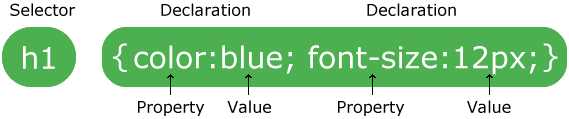
CSS rule-set consists of a selector and a declaration block:
CSS selector
The selector points to the HTML element you want to style.

The declaration block contains one or more declarations separated by semicolons.

Each declaration includes a CSS property name and a value, separated by a colon.

A CSS declaration always ends with a semicolon, and declaration blocks are surrounded by curly braces.

CSS Comments

Comments are used to explain the code, and may help when you edit the source code at a later date. Comments are ignored by browsers.
A CSS comment starts with /* and ends with */. Comments can also span multiple lines

Monday, 26 October 2015

HTML input type

                                     HTML input type

Input Type: text

<input type="text"> defines a one-line input field for text input:
example:
<form>
First name:<br>
<input type="text" name="firstname">
<br>
Last name:<br>
<input type="text" name="lastname">
</form>
This is how the HTML code above will be displayed in a browser:
First name:

Last name:


Input Type: password

<input type="password"> defines a password field:

<form>
User name:<br>
<input type="text" name="username">
<br>
User password:<br>
<input type="password" name="psw">
</form>

This is how the HTML code above will be displayed in a browser:
User name:

User password:

Input Type: submit

<input type="submit"> defines a button for submitting form input to a form-handler.
The form-handler is typically a server page with a script for processing input data.
The form-handler is specified in the form's action attribute:

<form action="action_page.php">
First name:<br>
<input type="text" name="firstname" value="Mickey">
<br>
Last name:<br>
<input type="text" name="lastname" value="Mouse">
<br><br>
<input type="submit" value="Submit">
</form>

This is how the HTML code above will be displayed in a browser:
First name:

Last name:


Input Type: radio

<input type="radio"> defines a radio button.
Radio buttons let a user select ONLY ONE of a limited number of choices:
<form>
<input type="radio" name="sex" value="male" checked> Male
<br>
<input type="radio" name="sex" value="female"> Female
</form>

This is how the HTML code above will be displayed in a browser:
 Male
 Female

Thursday, 22 October 2015

HTML Class


                        HTML Class Example 
<!DOCTYPE html>
<html>
<head>
<style>
div.cities {
    background-color:black;
    color:white;
    margin:20px;
    padding:20px;

</style>
</head>
<body>

<div class="cities">
<h2>London</h2>
<p>London is the capital city of England. It is the most populous city in the United Kingdom, with a metropolitan area of over 13 million inhabitants.</p>
</div>

<div class="cities">
<h2>Paris</h2>
<p>Paris is the capital and most populous city of France.</p>
</div>

<div class="cities">
<h2>Tokyo</h2>
<p>Tokyo is the capital of Japan, the center of the Greater Tokyo Area,
and the most populous metropolitan area in the world.</p>
</div>

</body>
</html>

Wednesday, 21 October 2015

HTML block

Every HTML element has a default display value depending on what type of element it is. The default display value for most elements is block or inline.

Block-level Elements

A block-level element always starts on a new line and takes up the full width available (stretches out to the left and right as far as it can).
The <div> element is a block-level element.

Examples of block-level elements:
  • <div>
  • <h1> - <h6>
  • <p>
  • <form>

The <div> Element

The <div> element is a block-level element that is often used as a container for other HTML elements.
The <div> element has no required attributes, but style and class are common.

EXAMPLE

<div style="background-color:black; color:white; padding:20px;">

<h2>London</h2>
<p>London is the capital city of England. It is the most populous city in the United Kingdom, with a metropolitan area of over 13 million inhabitants.</p>

</div>