Friday, 27 November 2015

J2EE

J2EE
Java Platform, Enterprise Edition or Java EE is a widely used platform for server programming in the Java programming language. The Java platform (Enterprise Edition) differs from the Java Standard Edition Platform (Java SE) in that it adds libraries which provide functionality to deploy fault-tolerant, distributed, multi-tier Java software, based largely on modular components running on an application server.

The J2EE SDK architecture consists of the following components:

·         The J2EE server
·         The EJB Container

·         The Web Container

Friday, 20 November 2015

About Congress


                          About Congress


This page consists the information of congress party objective.
"The object of the Indian National Congress is the well-being and advancement of the people of India and the establishment in India, by peaceful and constitutional means, of a Socialist State based on Parliamentary Democracy in which there is equality of opportunity and of political, economic and social rights and which aims at world peace and fellowship."

Allegiance to Constitution of India, Article II - INC Constitution

The Indian National Congress bears true faith and allegiance to the Constitution of India as by law established and to the principles of socialism, secularism and democracy and would uphold the sovereignty, unity and integrity of India.


Thursday, 19 November 2015

Design of main page of PLM Software

                              Detail of main page


The main page of PLM Software consists of the Mission and Vision of the Congress Party.
The page is Fully responsive and you can open the site in your  pc as well as on your mobile and Tabs.

Wednesday, 18 November 2015

Validation used in PLM Software

                    Validation used in PLM Software

PLM Software is all about the corruption which happens in the govt. department and the politics.
The main focus in this software s to avoid the corruption. There was not any intermediate between the political leader and the common users,in the existing software's.

So we developed this PLM Software to avoid corruption. for the security purpose we add some validation phase.

1. Firstly the validation of email, when the user create the account
2. Validation of person from his PAN number.
3.  File uploading and validation of that files by the member of department.


Tuesday, 17 November 2015

Database Used in PLM Software


                   Database Used in PLM Software


MYSQL
MySQL Server (mysqld) is the main program that does most of the work in a MySQL installation. This chapter provides an overview of MySQL Server and covers general server administration:
·         Server configuration.
·         The server log files.
·         Management of multiple servers on a single machine.

When thinking about security within a MySQL installation, you should consider a wide range of possible topics and how they affect the security of your MySQL server and related applications:
·         General factors that affect security. These include choosing good passwords, not granting unnecessary privileges to users, ensuring application security by preventing SQL injections and data corruption, and others.
.
·         Security of the installation itself. The data files, log files, and the all the application files of your installation should be protected to ensure that they are not readable or writable by unauthorized parties.

·         Access control and security within the database system itself, including the users and databases granted with access to the databases, views and stored programs in use within the database.

·         Network security of MySQL and your system. The security is related to the grants for individual users, but you may also wish to restrict MySQL so that it is available only locally on the MySQL server host, or to a limited set of other hosts.


Monday, 16 November 2015

Technologies Used

                              Technologies Used

Eclipse:

Eclipse Mars is open source and is written in the Java programming language. It provides the services common to creating desktop applications such as window and menu management, settings storage and is also thefirst IDE to fully support JDK 5.0 features. The Eclipse platform and IDE are free for commercial and non-commercial use, and they are supported by
Sun Microsystems.
                                       
 Hibernate Framework
Hibernate framework simplifies the development of java application to interact with the database. Hibernate is an open source, lightweight, ORM (Object Relational Mapping) tool.

JSP technology is used to create web application just like Servlet technology. It can be thought of as an extension to servlet because it provides more functionality than servlet such as expression language, jstl etc.JSP technology is used to create web application just like Servlet technology. It can be thought of as an extension to servlet because it provides more functionality than servlet such as expression language, jstl etc.
                     

Friday, 13 November 2015

Characters Used In PLM Software


Admin:
1.      Admin has its own AdminId and password.
2.      Admin can add or delete users.
3.      Admin will give privileges to members and common peoples.
4.      Admin will take action on complaints.
5.      Admin can update the database.
6.      Admin can directly interact with members and registered peoples.
Members:
1.      Members has their own login Id and password.
2.      Members will take action against complaints.
3.      Members can directly interact with admin.
4.      Members will validate the proofs which is uploaded by the  peoples.
5.      Members can also updae the database.
Common Peoples:
1.      Common peoples have to register first.
2.      Then they needs to validate their email.
3.      The peoples can register the complaint.

4.      The peoples can directly interact with admin as well as with members.

Thursday, 12 November 2015

Function Of PLM Software

                     Function Of PLM Software


The website will allow access only to authorized users with specific roles (Administrator- maintains the website, Member-Take action of the complaint of corruption, peoples-register themselves and register complaint)
A summary of the major functions that the website will perform:
a. Provide facility to peoples to register to register against corruption.
b. Admin will take action agaist complaint.
c. peoples can login and register complaint.
d. Admin can add and delete users.
e. Members can also update the database.

Wednesday, 11 November 2015

Objective of PLM Software

1                              Objective of PLM Software


11.   In the previous years there was no any intermediate between any political party and the common  peoples, so the main objective of this project is, the communication between the peoples and  political leader.
22.     From the PLM Software the common peoples comes to know about the political leaders.
33.     There is an Anticorruption module and this is very useful to avoid corruption.
44.     Peoples can register there and communicate directly with leader.
55.    Peoples can also register complaints.
66.     They can also get the membership.
77.      Hukumchand amdhare is a political leader of congress.
88.   From the website of Hukumchand amdhre , we come to know about the mission and vision of      Congress party.

99.  We can also contact them, the proper contact of their office and contact number is given on there website.

Tuesday, 10 November 2015

Problem with existing systems

In the existing software  there was no any intermediate between any political party and the common peoples, so the main objective of this project is, the communication between the peoples and political leader. The poples was no able to communicate with the leader and the member of party.
 The existing system work manually. The existing system has got lot of intricacies within itself  and     need lot of human effort and paper works. All above the data need to be maintained on ledgers and maintaining this is a tedious and risky process. As the transactions increases, so the data too. So the task of maintaining them increases exponentially. To view a data may need lot of paper to be searched.

This software solves the communication gap between common people and political leader. 

Monday, 9 November 2015

Why PLM software

Reason to make PLM Software
Corruption is a form of dishonest or unethical conduct by a person entrusted with a position of authority, often to acquire personal benefit. Corruption may include many activities including  bribery and embezzlement, though it may also involve practices that are legal in many countries. Government, or political, corruption occurs when an office-holder or other governmental employee acts in an official capacity for personal gain.
Political corruption is the use of powers by government officials for illegitimate private gain. An illegal act by an officeholder constitutes political corruption only if the act is directly related to their official duties, is done under color of law or involves trading in influence.
PLM Software avoids the corruption.

Friday, 6 November 2015

Overview of PLM Software

The project PLM (political leader management) software is the software of Hukumchand Amdhare. He is a political leader of Nagpur. We have implementing anticorruption module to make the environment corruption free and it is really helpful to the common users.  For run this project we use “Eclipse Mars” in Java. Java programming language is used in this project. When the user wants to communicate with the server, it can do so by the graphical user interface provided. Main program is started by displaying a screen which contains the mission and vision of congress paty, Which made by us. It also contains the information of political leader Hukumchand Amdhare.

At the first we have given the information, history, mission and vision of Congress party. There is an anticorruption module which is use to register the complaint against corrupted peoples. For the security purpose we have given some validation phases. Peoples can also upload the files.

Thursday, 5 November 2015

Hukumchand Amdhare


ABOUT OUR PROJECT

We are creating an ERP software about a polictical leadear management system named Hukumchand Amdhare.
Firstly, We are creating the layout for this website and the add additional information like menu bar for the project and design a banner and make the complete site responsive by using css and bootstrap.

FRONT PAGE WITH WHICH THE USER INTERACTS WITH THE OFFICIAL WEBSITE OF HUKUMCHAND AMDHRAE.....


OUR VISIONS

  • Literacy is Basic to gender equliity & It bridges the gender divide
  • We cannot rest , It is Betrayal of the millions who never Rest
  • Let us build an indian.pround of her independece; Powerful in defence of her freedom
  • Breatures who have been utterly
  • Leader with Vision
  • The Indian National Congress bears true faith and allegiance to the Constitution of India.

Wednesday, 4 November 2015

Bootstrap Responsive Layout

Bootstrap Responsive Layout

In this tutorial you will learn how to create responsive web designs or layouts with Bootstrap framework.

What is Responsive Web Design or Layout

Responsive web design is a process of designing and building websites to provide better accessibility and optimal viewing experience to the user.
With the growing trend of smart phones and tablets, it has become almost unavoidable to ignore the optimization of sites for mobile devices. Responsive web design is a preferable alternative and an efficient way to target a wide range of devices with much less efforts.
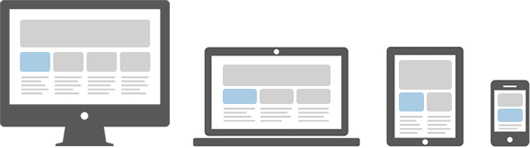
Responsive layouts automatically adjust and adapts to any device screen size, whether it is a desktop, a laptop, a tablet, or a mobile phone.
Bootstrap Responsive Design Illustration

Creating Responsive Layout with Bootstrap

With the new Bootstrap 3 mobile first grid system creating the responsive and mobile friendly websites has become much easier. As opposed to previous version you don't need to include any additional style sheet to enable responsive feature. Bootstrap 3 is responsive and mobile friendly from the start. Its four tiers grids classes provides better control over the layout as well as how it will be rendered on different types of devices like cell phones, tablets, desktop and laptops, large screen devices etc.

Tuesday, 3 November 2015

Bootstrap Grid System

Bootstrap Grid System

The Bootstrap grid system is the fastest and easy way to create a layout.

What is Bootstrap Grid System

Bootstrap grid system provides the quick and easy way to create responsive website layouts. As opposed to the previous Bootstrap 2.x grid system which is fixed by default, the new version, i.e. Bootstrap 3 introduces the responsive mobile first fluid grid system that appropriately scales up to 12 columns as the device or viewport size increases.
Bootstrap 3 includes predefined grid classes for quickly making grid layouts for different types of devices like cell phones, tablets, laptops and desktops, etc. For example, you can use the .col-xs-* class to create grid columns for extra small devices like cell phones, similarly the .col-sm-* class for small screen devices like tablets, the .col-md-* class for medium size devices like desktops and the .col-lg-* for large desktop screens. The following table summarizes some of the key features of the new grid system
Features
Bootstrap 3 Grid System
Extra small devices
Phones (<768px)
Small devices
Tablets (≥768px)
Medium devices
Desktops (≥992px)
Large devices
Desktops (≥1200px)
Max container width
None (auto)
750px
970px
1170px
Grid behavior
Horizontal at all times
Collapsed to start, horizontal above breakpoints
Class prefix
.col-xs-
.col-sm-
.col-md-
.col-lg-
Max column width
Auto
~62px
~81px
~97px
Gutter width
15px on each side of a column (i.e. 30px)
Above table demonstrates one important thing, applying any .col-sm-* class to an element will not only affect its styling on small devices, but also on medium and large devices having a screen size greater than or equal to 768px (i.e. ≥768px) if .col-md-* and .col-lg-* class is not present. Similarly the .col-md-* class will not only affect the styling of elements on medium devices, but also on large devices if a .col-lg-* class is not present.
Now the question arises how to create rows and columns using this 12 column responsive grid system. The answer is pretty simple, at first create a container that acts as a wrapper for your rows and columns using the .container class, after that create rows inside the container using the .row class, and to create columns inside any row you can use the class.col-xs-*.col-sm-*.col-md-* and .col-lg-*. The columns are actual content area where we will place our contents. Let's put all these things into real action.

Creating Two Column Layouts

The following example will show you how to create two column layouts for small, medium and large devices like tables, laptops and desktops etc. However, on mobile phones, the columns will automatically become horizontal as default.
Since Bootstrap grid system is based on 12 columns, so to keep the columns in a one line (i.e. side by side), the sum of the grid column numbers in each row should be equal to 12. If you see the above example carefully you will find the numbers of grid columns (i.e. col-sm-*) add up to twelve (6+64+8 and 3+9) for every row.

Creating Three Column Layouts

Similarly, you can create other layouts based on the above principle. The following example will typically create three column layouts for laptops and desktops screens. It also works in tablets in landscape mode if screen resolution is more than or equal to 992 pixels (e.g. Apple iPad). However, in portrait mode it will be horizontal as usual.

Bootstrap Layouts with Column Wrapping Feature

Now we are going to create more flexible layouts that changes the column orientation based on the viewport size. The following example will create a three column layout on medium devices like laptops and desktops, as well as on tablets (e.g. Apple iPad) in landscape mode, but on small devices like tablets in portrait mode, it will change into a two column layout where the third column moves at the bottom of the first two columns.