Thursday, 30 July 2015

Object And Classes

Object and Class in Java

Object is the physical as well as logical entity whereas class is the logical entity only.In this page, we will learn about java objects and classes. In object-oriented programming technique, we design a program using objects and classes.

Object in Java
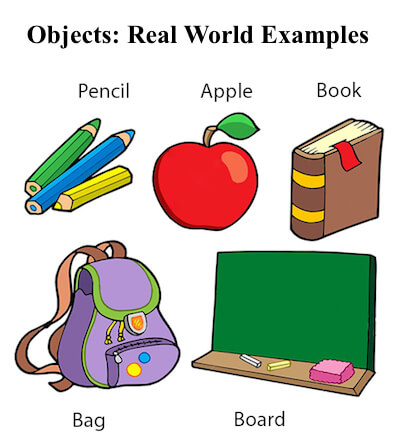
object in java
An entitythat has state and behavior is known as an object e.g. chair, bike, marker, pen, table, car etc. It can be physical or logical (tengible and intengible). The example of integible object is banking system.
An object has three characteristics:
  • state: represents data (value) of an object.
  • behavior: represents the behavior (functionality) of an object such as deposit, withdraw etc.
  • identity: Object identity is typically implemented via a unique ID. The value of the ID is not visible to the external user. But,it is used internally by the JVM to identify each object uniquely.

    Simple Example of Object and Class

    In this example, we have created a Student class that have two data members id and name. We are creating the object of the Student class by new keyword and printing the objects value.
    1. class Student1{  
    2.  int id;//data member (also instance variable)  
    3.  String name;//data member(also instance variable)  
    4.   
    5.  public static void main(String args[]){  
    6.   Student1 s1=new Student1();//creating an object of Student  
    7.   System.out.println(s1.id);  
    8.   System.out.println(s1.name);  
    9.  }  
    10. }  
    11. Example of Object and class that maintains the records of students

      In this example, we are creating the two objects of Student class and initializing the value to these objects by invoking the insertRecord method on it. Here, we are displaying the state (data) of the objects by invoking the displayInformation method.
      1. class Student2{  
      2.  int rollno;  
      3.  String name;  
      4.   
      5.  void insertRecord(int r, String n){  //method  
      6.   rollno=r;  
      7.   name=n;  
      8.  }  
      9.   
      10.  void displayInformation(){System.out.println(rollno+" "+name);}//method  
      11.   
      12.  public static void main(String args[]){  
      13.   Student2 s1=new Student2();  
      14.   Student2 s2=new Student2();  
      15.   
      16.   s1.insertRecord(111,"Karan");  
      17.   s2.insertRecord(222,"Aryan");  
      18.   
      19.   s1.displayInformation();  
      20.   s2.displayInformation();  
      21.   
      22.  }  
      23. }  

Wednesday, 29 July 2015

Buffer Reader and Scanner class

Topics

1.  Introduction to Buffer Reader and Scanner class.

Buffered Reader class can be used to read data line by line by readLine() method.

  1. BufferedReader has significantly larger buffer memory than Scanner. Use BufferedReader if you want to get long strings from a stream, and use Scanner if you want to parse specific type of token from a stream
  1. Scanner can use tokenize using custom delimiter and parse the stream into primitive types of data, while BufferedReader can only read and store String.
  1. BufferedReader is synchronous while Scanner is not. Use BufferedReader if you're working with multiple threads


Image result for Buffer Reader and Scanner class in java


Image result for Buffer Reader and Scanner class in java


2. difference between Buffer Reader and Scanner class


BufferedReader Read text from a character-input stream, buffering characters so as to provide for the efficient reading of characters, arrays, and lines. The buffer size may be specified, or the default size may be used. The default is large enough for most purposes.


Where Scanner is a simple text scanner which can parse primitive types and strings using regular expressions. A Scanner breaks its input into tokens using a delimiter pattern, which by default matches whitespace. The resulting tokens may then be converted into values of different types using the various next methods.

Tuesday, 28 July 2015

Introduction To Core Java

What is Java

Java is a programming language and a platform.
Java is a high level, robust, secured and object-oriented programming language.
Platform: Any hardware or software environment in which a program runs, is known as a platform. Since Java has its own runtime environment (JRE) and API, it is called platform.

Where it is used?

According to Sun, 3 billion devices run java. There are many devices where java is currently used. Some of them are as follows:
  1. Desktop Applications such as acrobat reader, media player, antivirus etc.
  2. Web Applications such as irctc.co.in, javatpoint.com etc.
  3. Enterprise Applications such as banking applications.
  4. Mobile
  5. Embedded System
  6. Smart Card
  7. Robotics
  8. Games etc.

    Types of Java Applications

    There are mainly 4 type of applications that can be created using java programming:

    1) Standalone Application

    It is also known as desktop application or window-based application. An application that we need to install on every machine such as media player, antivirus etc. AWT and Swing are used in java for creating standalone applications.

    2) Web Application

    An application that runs on the server side and creates dynamic page, is called web application. Currently, servlet, jsp, struts, jsf etc. technologies are used for creating web applications in java.

    3) Enterprise Application

    An application that is distributed in nature, such as banking applications etc. It has the advantage of high level security, load balancing and clustering. In java, EJB is used for creating enterprise applications.

    4) Mobile Application

    An application that is created for mobile devices. Currently Android and Java ME are used for creating mobile applications.

Monday, 27 July 2015

Packages in java

Java Package

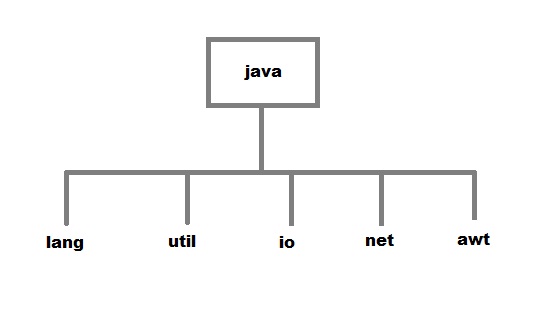
Package are used in Java, in-order to avoid name conflicts and to control access of class, interface and enumeration etc. A package can be defined as a group of similar types of classes, interface, enumeration and sub-package. Using package it becomes easier to locate the related classes.

Package are categorized into two forms

  • Built-in Package:-Existing Java package for example java.langjava.util etc.
  • User-defined-package:- Java package created by user to categorized classes and interface
Packages in java

Creating a package

Creating a package in java is quite easy. Simply include a package command followed by name of the package as the first statement in java source file.
package mypack;
public class employee 
{
 ...statement; 
}

The above statement create a package called mypack.
Java uses file system directory to store package. For example the .class for any classes you to define to be part of mypack package must be stored in a directory called mypack

Example of package creation

package books
class Book
{
 String bookname;
 String author;
 Book(String b, String c)
 {
  this.bookname = b;
  this.author = c;
 }
 public void show()
 {
  System.out.println(bookname+" "+ author);
 }
}

class test
{
 public static void main(String[] args)
 {
  Book bk = new Book("java","Herbert");
  bk.show();
 }
}
To run this program :
  • create a directory under your current working development directory(i.e. JDK directory), name it asmypack.
  • compile the source file
  • Put the class file into the directory you have created.
  • Execute the program from development directory.

Friday, 24 July 2015

Type casting

Topics

1. Introduction to type casting.
     
Type casting allows us to convert one data type into other. In C language, we use cast operator for type casting which is denoted by (type).


Image result for type casting in java

Thursday, 23 July 2015

Keywords In Java

super Usage:

1) super.<variable_name> refers to the variable of variable of parent class.
2) super() invokes the constructor of immediate parent class.
3) super.<method_name> refers to the method of parent class.

//Parent class or Superclass
class Parentclass
{
 int num=100;
}
//Child class or subclass
class Subclass extends Parentclass
{
    /* I am declaring the same variable 
     * num in child class too.
     */
    int num=110;
    void printNumber(){
  System.out.println(num);
    }
    public static void main(String args[]){
       Subclass obj= new Subclass();
       obj.printNumber(); 
    }
}
Output:
110

Static keyword in java

The static keyword is used in java mainly for memory management. Static keyword are used with variables, methods, blocks and nested class. Static is a keyword that are used for share the same variable or method of a given class. This is used for a constant variable or a method that is the same for every instance of a class. The main method of a class is generally labeled static.
No object needs to be created to use static variable or call static methods, just put the class name before the static variable or method to use them. Static method can not call non-static method.

In java language static keyword can be used for following

  1. variable (also known as class variable)
  2. method (also known as class method)
  3. block
  4. nested class

Static variable

If any variable we declared as static is known as static variable.
  • Static variable is used for fulfill the common requirement. For Example company name of employees,college name of students etc. Name of the college is common for all students.
  • The static variable allocate memory only once in class area at the time of class loading.

Advantage of static variable

Using static variable we make our program memory efficient (i.e it saves memory).

When and why we use static variable

Suppose we want to store record of all employee of any company, in this case employee id is unique for every employee but company name is common for all. When we create a static variable as a company name then only once memory is allocated otherwise it allocate a memory space each time for every employee.

Syntax for declare static variable:

public static variableName;

Wednesday, 22 July 2015

Exception Handling

Topics

1.Introduction  to Exception Handling.

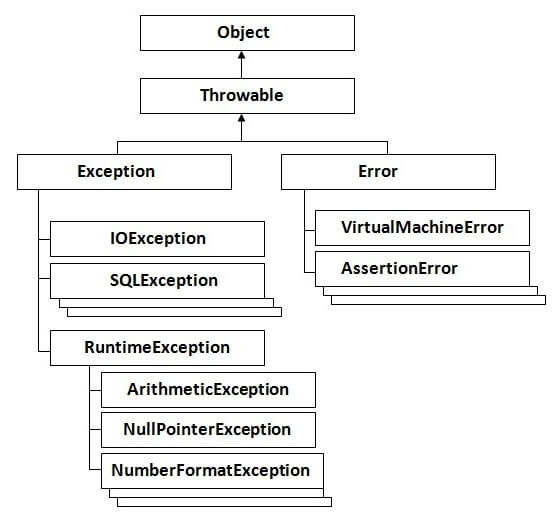
The exception handling in java is one of the powerful mechanism to handle the runtime errors so that normal flow of the application can be maintained.

hierarchy of exception handling

Tuesday, 21 July 2015

Ploymorphism

Polymorphism is the ability of an object to take on many forms. The most common use of polymorphism in OOP occurs when a parent class reference is used to refer to a child class object.
Any Java object that can pass more than one IS-A test is considered to be polymorphic. In Java, all Java objects are polymorphic since any object will pass the IS-A test for their own type and for the class Object.
It is important to know that the only possible way to access an object is through a reference variable. A reference variable can be of only one type. Once declared, the type of a reference variable cannot be changed.
The reference variable can be reassigned to other objects provided that it is not declared final. The type of the reference variable would determine the methods that it can invoke on the object.
A reference variable can refer to any object of its declared type or any subtype of its declared type. A reference variable can be declared as a class or interface type.

Example:

Let us look at an example.
public interface Vegetarian{}
public class Animal{}
public class Deer extends Animal implements Vegetarian{}
Now, the Deer class is considered to be polymorphic since this has multiple inheritance. Following are true for the above example:
  • A Deer IS-A Animal
  • A Deer IS-A Vegetarian
  • A Deer IS-A Deer
  • A Deer IS-A Object
When we apply the reference variable facts to a Deer object reference, the following declarations are legal:
Deer d = new Deer();
Animal a = d;
Vegetarian v = d;
Object o = d;
All the reference variables d,a,v,o refer to the same Deer object in the heap.

Image result for polymorphism in java

Monday, 20 July 2015

Inheritance

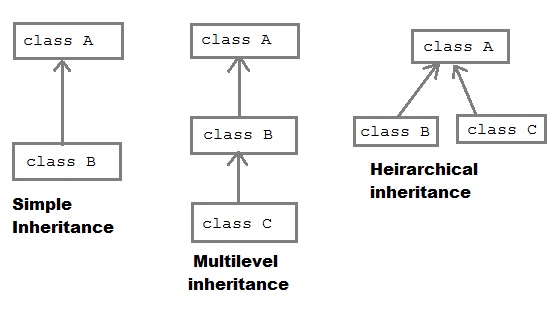
Inheritance is one of the feature of Object-Oriented Programming (OOPs). Inheritance allows a class to use the properties and methods of another class. In other words, the derived class inherits the states and behaviors from the base class. The derived class is also called subclass and the base class is also known as super-class. The derived class can add its own additional variables and methods. These additional variable and methods differentiates the derived class from the base class.
Inheritance is a compile-time mechanism. A super-class can have any number of subclasses. But a subclass can have only one superclass. This is because Java does not support multiple inheritance.
The superclass and subclass have “is-a” relationship between them. Let’s have a look at the example below.

Inheritance Example

Let’s consider a superclass Vehicle. Different vehicles have different features and properties however there few of them are common to all. Speed, color, fuel used, size are few which are common to all. Hence we can create a class ‘Vehicle’ with states and actions that are common to all vehicles. The subclass of this superclass can be any type of vehicle. Example: Class Car  A has all the features of a vehicle. But it has its own attributes which makes it different from other subclasses. By using inheritance we need not rewrite the code that we’ve already used with the Vehicle. The subclass can also be extended. We can make a class ‘Sports Car’ which extends ‘Car’. It inherits the features of both ‘Vehicle’ and ‘Car’.
The keyword used for inheritance is extends. Syntax:
public class ChildClass extends BaseClass  {
   // derived class methods extend and possibly override
}
Here is the complete example:
// A class to display the attributes of the vehicle
class Vehicle {
   String color;
   int speed;
   int size;
   void attributes() {
      System.out.println("Color : " + color);
      System.out.println("Speed : " + speed);
      System.out.println("Size : " + size);
   }
}

// A subclass which extends for vehicle
class Car extends Vehicle {
   int CC;
   int gears;
   void attributescar() {
      // The subclass refers to the members of the superclass
      System.out.println("Color of Car : " + color);
      System.out.println("Speed of Car : " + speed);
      System.out.println("Size of Car : " + size);
      System.out.println("CC of Car : " + CC);
      System.out.println("No of gears of Car : " + gears);
   }
}
public class Test {
   public static void main(String args[]) {
      Car b1 = new Car();
      b1.color = "Blue";
      b1.speed = 200 ;
      b1.size = 22;
      b1.CC = 1000;
      b1.gears = 5;
      b1.attributescar();
   }
}
The output is
Color of Car : Blue
Speed of Car : 200
Size of Car : 22
CC of Car : 1000
No of gears of Car : 5

Friday, 17 July 2015

Encapsulation

Topics

1. Introduction to Encapsulation.

Encapsulation in java is a process of wrapping code and data together into a single unit, for example capsule i.e. mixed of several medicines.
encapsulation in java
We can create a fully encapsulated class in java by making all the data members of the class private. Now we can use setter and getter methods to set and get the data in it.
The Java Bean class is the example of fully encapsulated class.

2. Advantage:

By providing only setter or getter method, you can make the class read-only or write-only.
It provides you the control over the data. Suppose you want to set the value of id i.e. greater than 100 only, you can write the logic inside the setter method.

Wednesday, 15 July 2015

Interface

Topics

1. Introduction to interface.

An interface in java is a blueprint of a class. It has static constants and abstract methods only.
The interface in java is a mechanism to achieve fully abstraction. There can be only abstract methods in the java interface not method body. It is used to achieve fully abstraction and multiple inheritance in Java.
Java Interface also represents IS-A relationship.


Image result for interface in java